DOI: https://doi.org/10.59350/vavg2-54v64
To mark this year’s Love Data Week, the QDR team is offering a duo of brief blog entries highlighting new features for our users and tips on how to make the most of the repository’s offerings. This is the first of the two.
In the ongoing efforts to make the metadata for each published data project as complete and as helpful as possible, QDR has started using persistent identifiers (PIDs) for all data authors and their institutions. While you are likely familiar with ORCID PIDs, which have been in use since 2012, the relative newcomers from the Research Organization Registry (ROR) are less well known but serve an analogous function.
Why use and care about PIDs?
Both sets of PIDs are ways to refer to something (researchers or universities and other entities) in a way that is structured, unambiguous and connect it to the research outputs in interoperable and technologically seamless ways. While you as a researcher may not think about (and mostly don’t need to!) metadata elements of this sort, one of the benefits of working with QDR is that the repository employs these features as part of the curation and publication service. Their application allows for better discoverability and display of research outputs.
For example, when you publish a data project with QDR, we automatically send metadata to Datacite, which is responsible for the DOI of your project (yes, that’s another PID; they’re everywhere). If you have Datacite integration enabled in your ORCID settings, that dataset will then automatically get added to your profile (this works similarly for journal articles you publish).
With ROR IDs, it is easy to quickly search for all deposits from researchers at a given institution by using the “Creator Affiliation” field in QDR’s advanced search. More globally, you can search for all datasets by researchers affiliated with an institution in DataCite’s search. Keep in mind, though, that ROR IDs are still pretty new, so this search won’t (yet) capture all published data.

How to add PIDs to metadata in QDR
You can automatically call up your and your collaborators’ ORCIDs (if available) when entering names in the Creator field for a new deposit. Typing the first few letters slowly will produce a list pulled “live” from the ORCID database; continuing to to type will further refine the available choices if needed. Similarly, typing the first few letters of your institution, you can select the institution’s name and ROR at the same time.
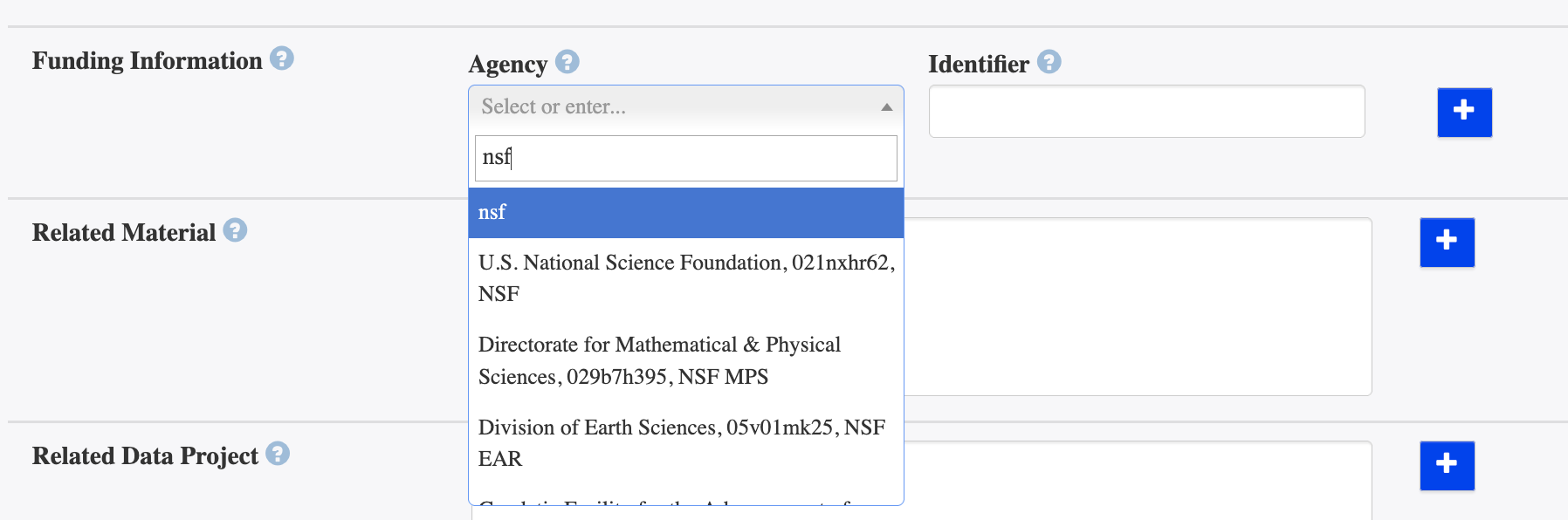
Another critical metadata field in which RORs are used is the Funder field, as more and more funders not only have a data sharing expectation, but want a clear record of where the data whose collection they supported reside after the end of a funded project. As this approach develops to encompass a structured way of representing award titles and other relevant details, QDR will continue incorporating these developments in its workflows.
For all the projects published on QDR prior to this metadata enhancement, we are retroactively applying this “PID-enhanced” metadata information.